
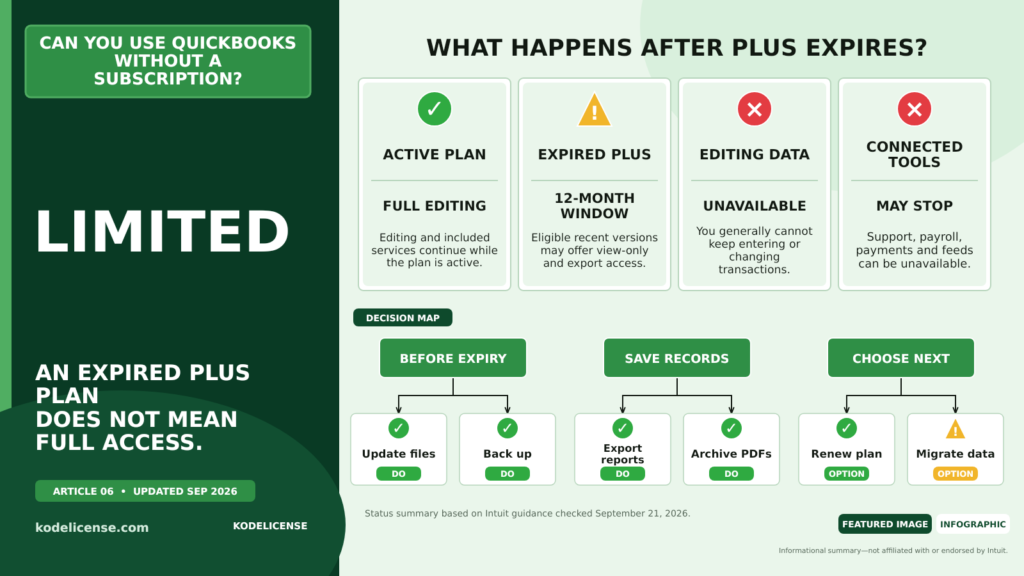
TL;DR: A subscription edition of QuickBooks Desktop does not retain full working access after the subscription expires. Intuit says eligible recent Plus versions receive view-only and export access for 12 months, while historical perpetual editions follow different rules but may be unsupported.
You generally cannot keep full editing access to a QuickBooks Desktop subscription edition after the subscription expires. What remains available depends on whether your software is a subscription product or an older perpetual edition.
What happens when QuickBooks Desktop Plus expires?
Intuit says cancellation takes effect at the next billing date. Until the current billing period ends, you can continue using the subscription.
After expiration, eligible versions provide view-only access for 12 months. During that period, you can view and export existing data, but you cannot edit the company data using the inactive license.
Intuit currently identifies view-only access for QuickBooks Desktop Plus for Windows 2023 R3 or newer and QuickBooks Mac Plus 2024 or newer.
Which features stop after cancellation?
Once the subscription expires, Intuit says you lose access to:
- Editing in QuickBooks Desktop
- Intuit customer support
- Data Recovery services
- Intuit Data Protect and other plan services
- Attached Desktop Payroll or Desktop Payments without another qualifying active Desktop subscription
Canceling the accounting subscription may not automatically cancel separate payroll or payments billing. Review each service in the appropriate Intuit account portal.
Can you open your company file after expiration?
With an eligible recent version, Intuit provides 12 months of view-only access after cancellation. You should use that period to export information, create reports, preserve backups, and decide whether to renew, move to Enterprise, or migrate to another accounting system.
Do not assume indefinite read access. Intuit’s stated view-only period is 12 months, and the feature has minimum release requirements.
What about older perpetual QuickBooks versions?
A historical perpetual edition is not controlled by a recurring Plus subscription in the same way. If it was validly licensed and remains compatible, it may continue allowing local data entry.
That does not mean it remains supported. Unsupported editions can lose security updates, payroll, payments, online bank feeds, email services, and other Intuit-connected features. Reinstallation or activation on replacement hardware may also be difficult.
If you are deciding whether to purchase such a product, read Can you buy QuickBooks Desktop without a subscription?
What should you do before your subscription expires?
- Install the latest release included in your active subscription.
- Create at least two verified backups of every company file.
- Export important lists, reports, and attachments.
- Confirm the final day of the billing period.
- Review payroll and payments subscriptions separately.
- Plan renewal or migration before editing access ends.
If the books are essential to tax filings, payroll, audits, or daily operations, consult your accountant before canceling.
Frequently Asked Questions
Can I still use QuickBooks Desktop after my subscription expires?
You may have 12 months of view-only and export access on eligible recent Plus versions, but you will not retain full editing access.
Can I reactivate later?
Intuit says suspended eligible Plus subscriptions can be renewed, subject to its current policies and billing requirements. Confirm your specific account status with Intuit.
Will my company data be deleted?
Your local company file is separate from the subscription status, but your ability to edit it in the subscription software changes. Maintain independent, verified backups.
Can I use payroll after the Desktop subscription ends?
Intuit says attached Payroll and Payments services require another qualifying active Desktop subscription, and separate service billing may also need to be canceled.
Key Takeaways
- An expired Plus subscription does not provide continued full editing access.
- Eligible recent versions receive 12 months of view-only and export access.
- Support and attached services end when the qualifying subscription ends.
- Back up and export critical data before the expiration date.